
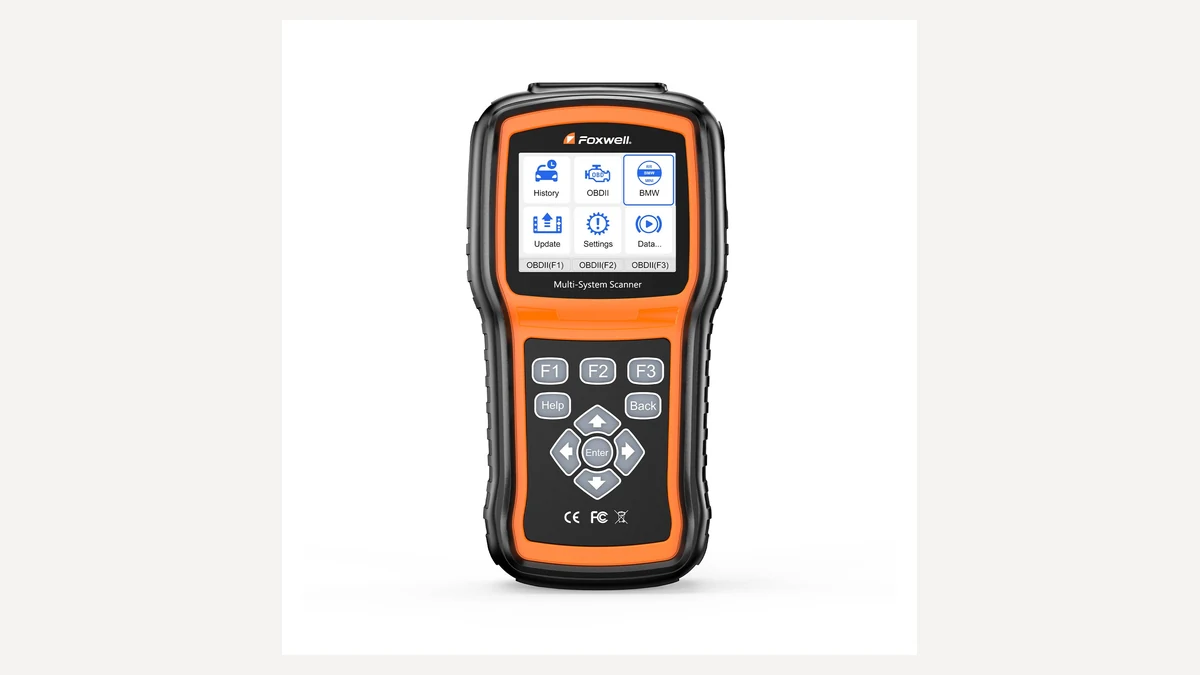
Quick answer: The Foxwell NT530 Plus makes a good handheld choice for Porsche system scans and supported active tests without a laptop. Ask Foxwell how Porsche software gets loaded, then verify your exact model-year and function before you order.
We haven’t tested this scanner ourselves. Everything below comes from Foxwell’s own product pages and support materials, so double-check anything specific to your car before buying.
The NT530 Plus is a brand-focused scanner. It comes loaded with software for one make you choose, and you can add more later for extra cost. That setup works well if you mainly work on one Porsche and want something portable.
Our Foxwell NT530 Plus verdict
Best for: DIY owners who want a handheld for Porsche system scans, live data, service resets, and supported bidirectional tests. It also suits a small specialist shop running a few selected makes.
Skip it if: you need ECU flashing, full module programming, key programming, or a public Porsche matrix that proves your exact task. Foxwell itself says coverage varies by model and wants buyers checking a vehicle-specific function list.
What the NT530 Plus includes
Foxwell’s official NT530 Plus page lists full-system diagnostics, live-data recording, bidirectional tests, and adaptations. Porsche shows up on the add-on software list.
The scanner ships with one make’s software and can hold up to five makes total. Porsche wasn’t a named base bundle when we checked. If your make isn’t listed, Foxwell wants you to order the unit and send its serial number for a software swap, so confirm that process before you pay.
- You don’t need a laptop at the car, it runs handheld.
- Full OBD-II functions come alongside brand-specific system access.
- Live data shows up in both text and graph formats.
- Supported functions cover active tests and adaptations.
- Foxwell backs it with lifetime free updates and lifetime technical support.
What it does not do
Foxwell’s product page says the scanner supports control-module coding. A separate Foxwell marketing article says it can’t change vehicle configurations or do ECU programming. Those two claims don’t fully agree, so we’re calling coding unconfirmed until Foxwell nails down the exact Porsche function in writing.
That same guide warns coverage varies by model. A function that works on one vehicle might not exist on another, so always check Foxwell’s function list or ask support about your exact year, model, and task.
How to check Porsche compatibility
- Write down your model, model year, chassis, and VIN.
- Name the exact task you need, oil reset, ABS bleed, battery registration, whatever it is.
- Run it through our Porsche diagnostic tool checker.
- Ask Foxwell to confirm the task for that car on current software.
We keep the NT530 Plus marked “Not verified” whenever the public materials don’t confirm the job on your particular Porsche. That’s not us saying the tool fails. It just means the broad product page can’t answer your exact compatibility question.
NT530 Plus vs iCarsoft POR V3.0
| Question | Foxwell NT530 Plus | iCarsoft POR V3.0 |
|---|---|---|
| Included makes | One selected make, expandable to five | Porsche-focused |
| Screen | 2.8 inches | 4 inches |
| Updates | Lifetime free updates listed | Lifetime free updates listed |
| Coverage check | Confirm exact vehicle and function | Confirm VIN and function |
Pick Foxwell if adding a few other makes down the line has real value for you. The iCarsoft POR V3.0 makes more sense as a Porsche-only handheld with a longer advertised list of service functions. Want computer-based diagnostics with clearer older-Porsche coverage records instead? Look at Durametric or PoCOM.
Price and buying checks
Foxwell prices vary by region, bundle, and selected software, so use the official store’s current price rather than trusting an old review figure. Ask how Porsche software gets loaded and whether it costs extra.
Foxwell listed a one-year warranty when we checked. Also confirm the return policy, update method, and delivery region. A scanner’s only a bargain if it actually performs the Porsche task you bought it for.
Foxwell NT530 Plus questions
Can it scan more than the engine?
Yes. Foxwell lists full-system diagnostics, but which systems you can actually reach depends on your exact Porsche.
Can it activate components?
It supports bidirectional tests where available. Ask Foxwell to confirm the specific component and your model-year before you buy.
Is Porsche software included?
Porsche shows up on Foxwell’s add-on list, but it wasn’t a named base bundle when we checked. Confirm the loading process with Foxwell before you order.
Does the Foxwell NT530 Plus work on Porsche?
Porsche shows up on Foxwell’s add-on software list. It wasn’t a named base bundle when we checked, so ask Foxwell how Porsche software will be loaded before you order.
Does the Foxwell NT530 Plus include lifetime updates?
Yes, Foxwell lists lifetime free updates and lifetime technical support for the NT530 Plus.
Can the Foxwell NT530 Plus program Porsche modules or keys?
No. Foxwell states that it doesn’t support ECU flashing, full module programming, or key programming.
Product image: © Foxwell, from the official NT530 Plus product page. Used for product identification in this editorial review.